
My Rush
Rush University System for HealthMedical
4.2111.00 Reviews
- Version
- 1.6.2
- Installs
- 10.00K
- Age Rating
- Teen
Screenshots
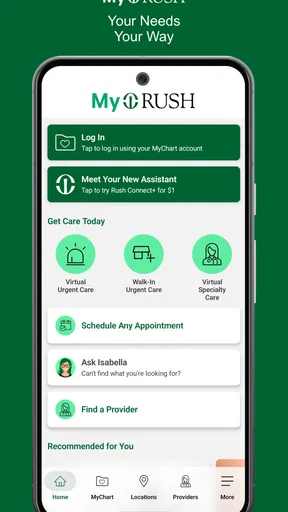
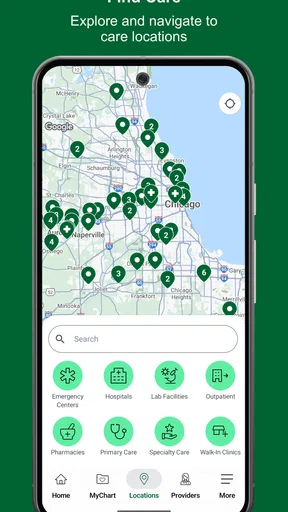
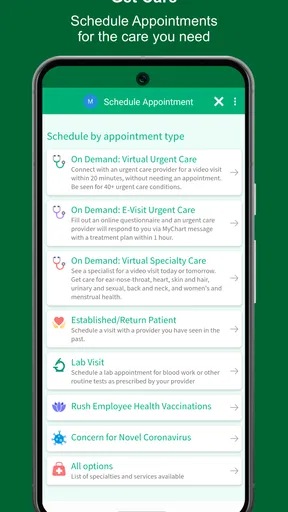
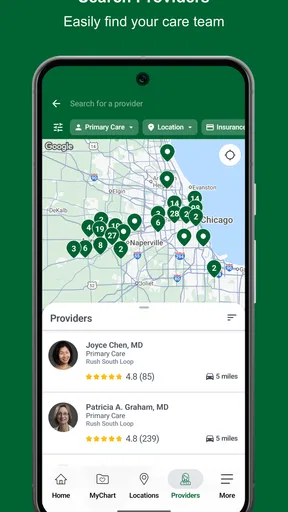
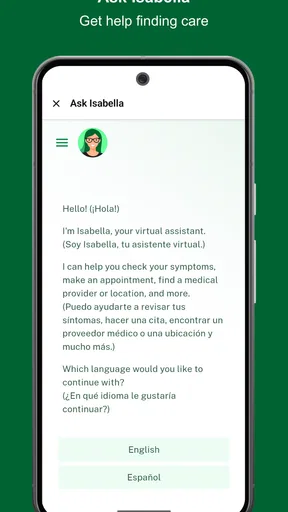
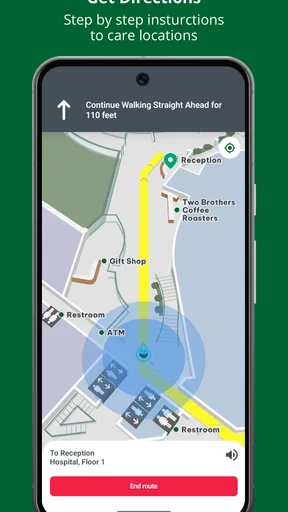
Our Review of My Rush
 Analysis by Appyee
Managing healthcare often becomes difficult at the exact moment when you are tired, worried, or trying to help someone else. My Rush is designed for that situation: it puts Rush healthcare management into a mobile app rather than leaving you to juggle separate browser pages, phone numbers, and paper reminders. I found it most useful as a practical starting point for people already connected with Rush University System for Health, especially when the goal is to move from “I need to deal with this” to a clearer next step.
This is a free medical app developed by Rush University System for Health. It is available for users on iOS 11 or later, carries a Teen content rating, and its current version is 1.6.2. The app has reached over ten thousand installs, with an average rating of 4.2 from more than two hundred ratings. Those figures suggest a modest but established user base rather than a universal healthcare tool, which matches my impression: its value depends heavily on whether Rush is part of your care journey.
From a healthcare concern to a manageable next step
I find it easier to approach a healthcare app when I first name the concern I’m trying to manage, rather than browsing without a goal. That small pause can help me decide whether a mobile workflow is suitable or whether I need to speak with a professional directly. From there, I can look at how the app supports the next steps without expecting it to resolve every kind of concern.
Starting with the situation you actually have
The best way to understand My Rush is to begin before opening it. Imagine that you have an upcoming appointment, a question about your care, or a follow-up task that you do not want to lose in your email. The usual alternative is to search through a provider website, call a department, wait for a response, or keep notes in a separate app. My Rush gives that process a more focused home.
I would not treat it as a general medical encyclopedia or a replacement for urgent care. It is a healthcare-management app, so its strength is organization around your relationship with Rush rather than broad medical education. That distinction matters. If you are looking for symptom interpretation, medication research, or an independent second opinion, a different medical resource may be more appropriate. If your immediate problem is keeping track of Rush-related care, the app makes much more sense.
Before relying on any healthcare app, I recommend deciding what you want to accomplish in the current session. A useful goal might be checking an upcoming appointment, reviewing a message, preparing information for a visit, or following up after care. This simple habit prevents the app from becoming another place where information accumulates without helping you act.
Working through the app instead of around it
My first practical approach was to use the app as a sequence rather than as a collection of isolated screens. Start by opening the account area and identifying the care item that needs attention. From there, move toward the relevant appointment, communication, or healthcare-management task. The benefit is not just convenience; it is continuity. You are less likely to begin with a general web search and end up in the wrong department or an outdated page.
The useful workflow is deliberately ordinary. I would check the app before calling, gather the details connected with the issue, and then decide whether the next step belongs inside the app or requires direct contact with a healthcare professional. That last decision is important because a digital account can organize care without being able to resolve every clinical or administrative question.
For an appointment, I would use the app as a preparation checkpoint. I can look at the information available to me, make a short list of questions, and keep those questions close to the visit rather than trusting memory. For a follow-up concern, I would first review the relevant information already present, then use the appropriate communication route instead of sending a vague message that forces staff to ask for basic context.
The strongest habit is to use My Rush before the problem becomes urgent. Checking details in advance gives you time to notice a scheduling issue, collect information, or choose a phone call when the app is not the right channel. That is more valuable than simply having another icon on the home screen.
Preparing information for a real conversation
One less obvious benefit of a healthcare-management app is that it can improve the handoff between your memory and the clinical conversation. I often forget the order of symptoms, the wording of a previous instruction, or the question that seemed important the night before an appointment. Using the app as a prompt helps me arrive with a clearer purpose.
My recommendation is to separate information gathering from decision-making. First, review what the app shows. Next, write down what remains unclear in your own words. Finally, choose whether to ask through the available digital route, contact the office, or bring the issue to an appointment. This avoids a common mistake: assuming that because information is visible in an app, the app has already answered the medical question.
This workflow is particularly useful for family members helping someone coordinate care. A relative may be handling reminders, preparing questions, or checking whether a task has been addressed. However, shared healthcare management can involve privacy and account boundaries, so I would not assume that one person should casually use another person’s account. The app can support coordination, but the people involved still need to agree on who is responsible for each step.
Where the handoffs happen
Healthcare rarely stays inside one tool. My Rush may be the place where you begin, but the process can move to a clinician, a clinic department, a phone conversation, or an in-person visit. I found it helpful to think of the app as the connector between those moments rather than expecting it to complete everything by itself.
A good handoff includes context. If you contact a care team after reviewing the app, explain what you were trying to do, what information you found, and what remains unresolved. That makes the conversation more efficient than simply saying that something is missing. The app helps you locate the issue; your message or conversation should help another person understand it.
The same principle applies after an appointment. Instead of closing the app and relying on memory, use it as part of a short follow-up routine. Review any new information, identify the next action, and note what needs to happen outside the app. This is where a healthcare app can become genuinely useful: not because it removes every handoff, but because it makes the handoffs easier to remember.
There is also a trade-off here. A centralized app can feel simpler than several disconnected channels, but centralization does not guarantee that every part of care appears in exactly the same way or at the same time. If something seems incomplete or confusing, I would verify it with the relevant Rush department rather than treating the screen as the final authority.
What the workflow produces
The result I want from My Rush is not a long session. It is a clear answer to one practical question: what do I need to do next? That might mean preparing for an appointment, following up with the right team, checking information connected with care, or recognizing that a phone call is necessary.
That outcome makes the app more useful for recurring healthcare administration than for one-time curiosity. People who regularly interact with Rush can benefit from having a familiar place to begin. The app is also a reasonable choice for someone who prefers a phone-based workflow and wants to reduce the number of separate web pages involved in managing care.
Its free price removes one common barrier to trying it, although “free” does not mean that every healthcare service becomes available without other conditions. The app is a tool for managing the relationship with the health system, not a promise that all care tasks can be completed digitally. I would judge it by whether it saves me time and confusion in my specific Rush workflow, not by whether it replaces every other form of contact.
The public response is encouraging without being overwhelming. My Rush holds a 4.2 average across more than two hundred ratings and has over a hundred written reviews. I see that as a sign that many users find it worthwhile, while also leaving room for individual experiences to vary depending on account setup, care department, and the task being attempted.
Where the flow breaks down
The biggest limitation is scope. If you are not receiving care through Rush University System for Health, the app is unlikely to become a central part of your healthcare routine. A general health tracker, your insurer’s app, or a broader patient portal may serve you better if your providers are spread across different systems.
It can also be frustrating when your question does not fit a neat administrative category. Healthcare concerns are often mixed: part scheduling, part clinical, and part emotional. An app can help you find the starting point, but it cannot replace professional judgment or a conversation that requires nuance. When the issue is urgent, severe, or potentially dangerous, I would not wait for an app-based response.
Another point of friction is the need to switch channels. You may begin in My Rush, discover that a department must handle the issue directly, and then move to a call or visit. That is not necessarily a flaw in the app; it reflects how healthcare works. Still, users expecting a single tap to resolve every request may find the experience less seamless than the store summary suggests.
I also would not choose it solely because it has a high-enough rating or because it is free. The relevant question is whether Rush is your provider and whether your everyday needs involve healthcare management rather than general wellness. For someone who wants exercise tracking, diet coaching, symptom journaling, or medication education, this is the wrong category of app.
Who should use it and who should skip it
I would recommend My Rush to Rush patients who want a focused mobile starting point for managing care. It is especially suitable for people who regularly check appointments, prepare for visits, follow up on instructions, or need a more organized route into communication with their healthcare system.
It may also help caregivers who are supporting a family member’s routine, provided they handle account access and personal information responsibly. The most effective users will be willing to combine the app with ordinary habits: keeping questions concise, checking details before appointments, and knowing when to move from digital management to direct professional help.
I would skip it if Rush is not part of your care, if you need a universal record across multiple health systems, or if your main interest is tracking personal wellness data. I would also avoid depending on it as the only route for urgent concerns. A healthcare-management app is valuable when it organizes a normal care process; it is not the right tool for every medical situation.
My final take on the everyday workflow
After using My Rush as a beginning-to-end workflow, I see its value in the small transitions: from concern to preparation, from preparation to communication, and from communication to a concrete next step. It does not eliminate the need for clinicians, office staff, phone calls, or appointments. What it can do is give Rush patients a more direct place to organize those interactions.
The app’s free access, medical focus, and current version 1.6.2 make it easy to try if Rush is already part of your healthcare. Its Teen rating is worth noting for families, but I would still treat account access and health information as personal matters that require care. The experience is most convincing when you have a specific task in mind rather than when you open it without a purpose.
My Rush is best viewed as a practical doorway into Rush care, not as a complete replacement for healthcare communication. I would recommend it to eligible patients who want fewer scattered steps and a clearer routine. I would choose another option for general wellness, multi-provider management, or urgent medical needs. Used with those boundaries in mind, it can turn a vague healthcare chore into a more manageable sequence of actions.
Verdict
Strengths of My Rush
- Quick, simple gameplay suited to short sessions.
- Responsive controls make it easy to learn the basics.
- Bright visuals give the game an appealing casual style.
- Progression encourages repeated play and experimentation.
- Works well for players looking for a lightweight time-killer.
Limitations of My Rush
- Gameplay may feel repetitive after extended sessions.
- Limited depth could disappoint experienced mobile gamers.
- Some levels may rely heavily on trial and error.
- Requires patience when difficulty increases unexpectedly.
- Performance may vary on older or less powerful devices.
Similar Picks in This Category
View All
WebMD: Symptom Checker
WebMD, LLC4.1

Microphone Amplifier
DOSA Apps4.2

Anatomy Learning - 3D Anatomy
3D Medical OU4.5

Period Tracker and Calendar
SimpleInnovation4.9

GoodRx: Prescription Coupons
GoodRx4.8

CVS Health
CVS Pharmacy4.5
Frequently Asked Questions
What is My Rush and what can I do with the app?
My Rush is a mobile application designed to give users a convenient way to access its main services and features from an Android or iOS device. After installing it, you can explore the available sections, manage your account or preferences, and use the tools provided by the platform. The exact experience may vary depending on your location, device, and the version currently available.
Is My Rush free to download and use?
My Rush can generally be downloaded without an upfront installation fee, but some features or services may require payment, a subscription, or an account with the provider. Before confirming any purchase, review the pricing information shown inside the app and check whether subscriptions renew automatically. Availability of paid options can also differ between countries, operating systems, and promotional offers.
Does My Rush require an account or personal information?
Depending on which parts of My Rush you want to use, the app may ask you to create an account or provide information such as an email address, phone number, name, or location. Some basic content may be accessible without registration, while personalized features usually require sign-in. It is worth reading the privacy policy and checking the requested permissions before completing setup.
Is My Rush safe and compatible with my device?
My Rush should be downloaded from an official app store or a trusted source to reduce the risk of installing a modified or unsafe version. Compatibility depends on your Android or iOS version, available storage, and device model. During testing, users should also review the permissions requested by the app and keep both the application and operating system updated for better security and stability.
Does My Rush work offline, and does it need an internet connection?
The need for an internet connection depends on the feature you are using. My Rush may allow certain information or settings to remain available locally, but functions involving account synchronization, online content, updates, location services, or transactions normally require Wi-Fi or mobile data. If you plan to use it while traveling, test the important features beforehand and check possible data usage.
